AI workflow builder: Automate Tasks and Save More Time
Introduction
Does your workday feel packed with repetitive tasks that never seem to end? Managing emails, updating records, and switching between tools can take up hours you could spend growing your business. An AI workflow builder can help take those everyday tasks off your plate, so you can focus on work that actually matters.
In this guide, you’ll learn how AI workflow automation works, which features to look for, and how to build smarter workflows without complicated coding. We’ll also explore popular tools, real-world examples, and practical tips to help you save time, reduce manual work, and improve productivity.
What Is an AI Workflow Builder?
An AI workflow builder is a tool that helps you connect applications, organize tasks, and automate business processes using artificial intelligence. Instead of completing every step manually, you create a workflow that handles routine activities automatically. These systems can process information, make decisions within defined limits, and move tasks between connected applications.
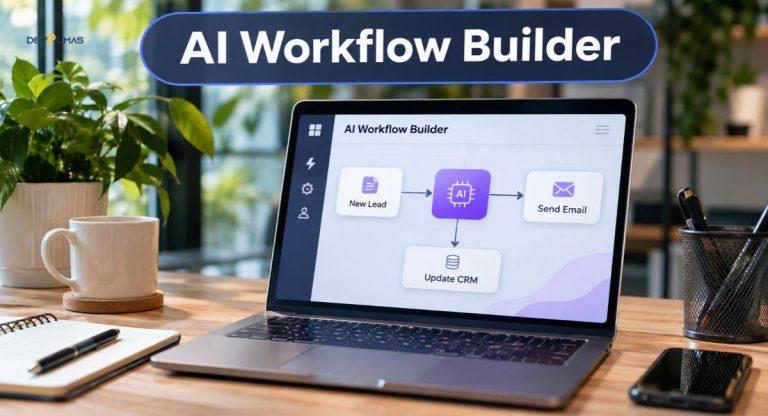
Think of it as a digital assistant following instructions you’ve already prepared. For example, when a customer submits a contact form, an AI workflow builder can categorize the inquiry, update your CRM, and notify your sales team. Some systems can even suggest personalized responses based on the customer’s request. The goal is to reduce repetitive work while keeping important decisions under your control.
Why Businesses Need AI Workflow Automation
Running a business involves countless small tasks that quietly consume valuable time. Employees often spend hours entering customer information, sending reminders, or transferring details between applications. AI workflow automation helps businesses simplify these activities and give employees more time for meaningful work. It can also improve consistency when teams follow the same processes every day.
Business process automation becomes especially valuable as customer requests and daily operations increase. A growing company might struggle to manage hundreds of inquiries through manual processes alone. Automated workflows can organize incoming requests, update records, and alert employees when something needs attention. This allows businesses to handle larger workloads without constantly adding administrative responsibilities.
Key Benefits of Automating Business Workflows
Intelligent workflow automation offers several practical benefits, including reduced manual workload, faster response times, and improved business productivity. It can also help reduce human errors caused by repeated data entry. Automated notifications keep employees informed without requiring constant follow-ups. However, the biggest advantage is often flexibility, because teams can spend less time managing routine tasks and more time serving customers.
Essential Features of an AI Workflow Builder
Choosing the right automation platform starts with understanding its features. A good system should offer simple workflow creation, reliable application connections, and flexible automation rules. Many platforms include visual editors that let you connect tasks using a drag-and-drop interface. This makes building workflows easier, especially for people without programming experience.
Another useful feature is AI-powered decision-making. Unlike basic automation that follows fixed instructions, AI-enabled workflows can interpret messages, summarize documents, and classify requests. Look for workflow performance monitoring, error notifications, and secure third-party app integrations as well. These features help you identify problems early and keep automated processes running reliably.
How to Build an AI Workflow Step by Step
Creating an automated workflow doesn’t have to be complicated. Start by identifying a repetitive task that follows a clear process, such as sending appointment confirmations or updating customer records. Write down each step, including what starts the process and what should happen afterward. This gives you a simple roadmap before choosing any AI automation tools.
Next, select an AI workflow builder that supports your applications and business needs. Connect the required tools, configure your workflow triggers and actions, and decide where artificial intelligence adds value. For example, an AI model might categorize incoming messages while ordinary automation handles email notifications. Start small, because testing one simple workflow is easier than troubleshooting a complicated system.
Steps to Create Your First Automated Workflow
Begin by identifying one repetitive task and defining the result you want. Next, choose a suitable platform and connect your business applications. Set a trigger, such as receiving a new form submission, and add actions that process the information. Test the workflow with sample data before activating it. Finally, review its performance regularly and adjust any steps that produce unexpected results.
Best AI Workflow Builder Tools for Businesses
Several workflow automation software platforms help businesses connect applications and automate daily operations. The best option depends on your technical experience, budget, and workflow complexity. Some platforms focus on easy setup, while others provide advanced customization and control. Before selecting a tool, consider which applications your business already uses and whether the platform supports them.
A no-code AI workflow builder can be useful for small businesses that want to automate processes quickly. Larger teams may prefer platforms offering advanced integrations, custom APIs, detailed monitoring, and more control over data. Remember that not every task requires artificial intelligence. Simple rule-based automation is often faster, cheaper, and more predictable when the steps never change.
Popular AI Automation Platforms
Zapier is useful for connecting everyday business applications and creating automated tasks with minimal coding. Make offers a visual interface for building multi-step workflows and adding AI agents. n8n provides flexible workflow customization and self-hosting options for technically experienced teams. Microsoft Power Automate works well for organizations using Microsoft applications, including Outlook, Excel, and SharePoint. Each platform has different capabilities, limitations, and pricing structures.
Real-World Examples of AI Workflow Automation
One practical example is automated lead management. Imagine a potential customer submits a service inquiry through your website. An automation system can collect the information, classify the request, and create a record in your CRM. It can then notify the appropriate salesperson or prepare a follow-up message. This helps your team respond consistently without copying information between multiple applications.
AI-powered customer support offers another useful example. Businesses can use automated workflows to categorize support tickets, suggest answers to common questions, and route complicated problems to human agents. Appointment-based companies can automate booking confirmations and reminders. Similarly, marketing teams can use AI task automation to organize campaign data, prepare summaries, and generate reports that employees review before sharing.
How DevPumas Helps Businesses Build Smarter AI Workflows
Not every business can solve its workflow problems with a ready-made automation platform. Sometimes, existing software doesn’t communicate properly, or a process requires custom rules and integrations. DevPumas develops AI agents and automation solutions designed around specific business requirements. Its services include workflow automation, CRM and helpdesk integrations, customer support agents, and appointment booking systems.
DevPumas also builds AI agents that can complete multi-step tasks while allowing human intervention when necessary. For example, a business could connect an AI support agent with its existing customer management system to organize requests and escalate difficult conversations. The company also offers custom software development and AI integration services.
Common Challenges in AI Workflow Automation
Although automation offers many advantages, setting it up correctly takes planning. Businesses sometimes face problems with incompatible applications, incomplete information, or incorrectly configured triggers. A workflow might also produce the wrong result if an AI model misunderstands customer instructions. These issues become more serious when automated actions affect payments, customer records, or sensitive business information.
The best approach is to test workflows carefully and introduce safeguards before using them in daily operations. Human-in-the-loop automation allows employees to approve important actions or review uncertain decisions. Businesses should also protect customer information, limit system permissions, and monitor automation logs. Regular maintenance helps identify broken connections and prevent small mistakes from affecting larger processes.
How to Choose the Right AI Workflow Builder
Start by understanding what your business actually needs to automate. A small service company may only require appointment reminders, email notifications, and basic customer relationship management integration. A larger organization might need advanced AI agents, multiple application connections, and customizable approval processes. Choose software that solves your current problems without making everyday tasks unnecessarily complicated.
Pricing is another important consideration. Some automation platforms charge based on workflow executions, tasks, users, or AI usage. Compare these costs alongside integration options, security features, and available technical support. It also helps to test a small workflow before making a long-term commitment. The right platform should simplify operations today while supporting future business growth.
FAQs
1. What is an AI workflow builder?
It’s a software tool that connects applications and automates tasks using predefined rules and, where needed, artificial intelligence.
2. Can I create AI workflows without coding?
Yes. Many platforms offer visual editors, ready-made templates, and no-code automation features suitable for beginners.
3. What are the best AI workflow automation tools?
Popular options include Zapier, Make, n8n, and Microsoft Power Automate. The best choice depends on your integrations, budget, and technical needs.
4. How much does AI workflow automation cost?
Costs vary by platform, usage, and features. Some tools provide free plans, while advanced workflows, AI usage, and custom integrations may require additional spending.
5. Can small businesses benefit from AI workflows?
Absolutely. Small businesses can automate lead management, appointment reminders, customer inquiries, and routine administrative tasks without building large technical teams.
Conclusion
Repetitive tasks shouldn’t take up most of your working day. With the right AI workflow builder, you can automate everyday processes, improve productivity, and give your team more time for important responsibilities. Start with a simple workflow, measure the results, and gradually expand automation as your business grows.
If your business needs more than standard automation tools, custom AI solutions may be worth exploring. DevPumas helps businesses develop AI agents, connect existing systems, and create workflows that support real operational needs. Explore its services to find an automation approach that fits your business.